Journeys analysed
0
Across all saved cards
See what is ready to claim, what needs checking and what happened next.
Choose a TfL statement and we will detect the format, skip duplicates and check each journey.
PDF for contactless cards, CSV for Oyster. You can add more than one file.
Manage your account, plan and claim suggestions.
Checking sign-in…
Sign in to save your journeys to your account and keep them in sync across devices.
Choose how many borderline journeys appear.
TfL's eligibility rules stay the same.
Add your date of birth to see whether an age-based Railcard could reduce eligible off-peak fares.
Used only for your savings estimate. Select the discount actually registered on each Oyster card. Fare values alone are not enough to detect it reliably because caps, zones and concessions overlap.
Forward TfL emails to update claim outcomes automatically. Oyster exports can also import journeys.
Live TfL disruptions across the Tube, DLR, Overground and Elizabeth line. It refreshes on its own, and any journey that overlaps a logged disruption gets flagged in your results table.
Across the journeys in your current view.
Minutes travelled, split by peak and off-peak starts.
Where your recorded travel time was spent.
Peak estimates use weekday TfL time bands. Railcard figures are indicative: standard discounts use off-peak Oyster fares, while Disabled Persons Railcard estimates include peak travel. Daily caps and route-specific exclusions can change the final amount.
Screening result for the selected period.
Calculated delay by journey date.
Successful refunds in the selected period.
Top journeys with a usable baseline.
Expected times are saved and reused. We only check new or changed journeys.
| Date | Journey | Time | Delay | Eligibility | Claim status | Actions |
|---|
Useful when copied statement formatting is awkward.
Automatic estimates are saved and reused. Only correct a time when you know the suggested route is wrong.
Journeys are saved on this device. Sign in to sync them across devices.
Independent delay screening
Check Tube, DLR, London Overground and Elizabeth line journeys for delays that may qualify for a TfL Service Delay Refund. Import locally for free, then decide what to submit.
We never ask for your TfL password and never log in to your TfL account. Stay signed out for browser-only analysis, or create an account when you want secure sync.
Upload or paste a statement and we analyse it in your browser. While signed out, your journey data stays on that device.
Create a free account with an email when you want your journeys and claim statuses available across devices.
Paid plans can import Oyster journey emails and match forwarded TfL claim outcomes without accessing your mailbox.
Download your journey history from TfL (CSV for Oyster, PDF for contactless) and import it here. Paid Oyster plans can also import forwarded journey exports automatically.
We estimate the expected route time using TfL journey data and compare it with your recorded trip, including any logged service disruption that overlaps the journey.
Open TfL's official Service Delay Refund form from a candidate journey and use the details shown here. TfL makes the final eligibility decision and pays any refund directly.
Update claim statuses yourself, or forward TfL outcome emails on a paid plan so matching journeys are updated automatically.
Plain-English guidance on the rules, the data you can import and what each dashboard result means.
Understand the 15- and 30-minute thresholds, deadlines and common exclusions before you claim.
Read the eligibility guideChoose the right Oyster CSV or contactless PDF and avoid the most common import problems.
Follow the import guideSee how expected times, known disruptions and claim suggestions are calculated and limited.
Read the methodology guideKeep submitted, approved, rejected and paid claims organised without losing the underlying journey.
Read the claim guideUse the core dashboard free. Paid plans add longer history, ad-free use and automatic email tracking.
Check recent journeys and manage claims yourself, with optional account sync.
Thirty days of history with automatic tracking for one Oyster card.
Unlimited history and automatic tracking across multiple cards.
This tool is free and runs on a shoestring. If it has put money back in your pocket, a small tip covers the hosting and keeps it free for everyone.
One-off tips of any size mean a lot and go straight towards the AWS bill that powers the live TfL tracking.
Would rather upgrade? See the Plans tab for ad-free use and automatic claim tracking.
Get your journey history out of TfL and into this dashboard in a few steps, plus answers to the questions we hear most.
Go to account.tfl.gov.uk/my-account and sign in with the account that holds the Oyster or contactless card you travel with.
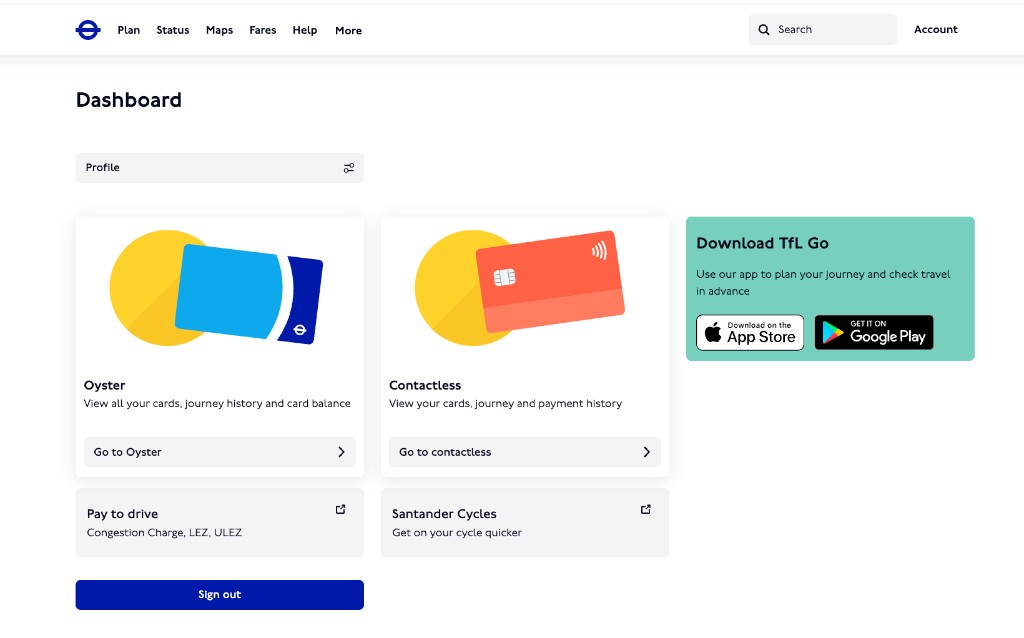
Open your Oyster or Contactless card from the account dashboard, then under Journeys select View journey history.
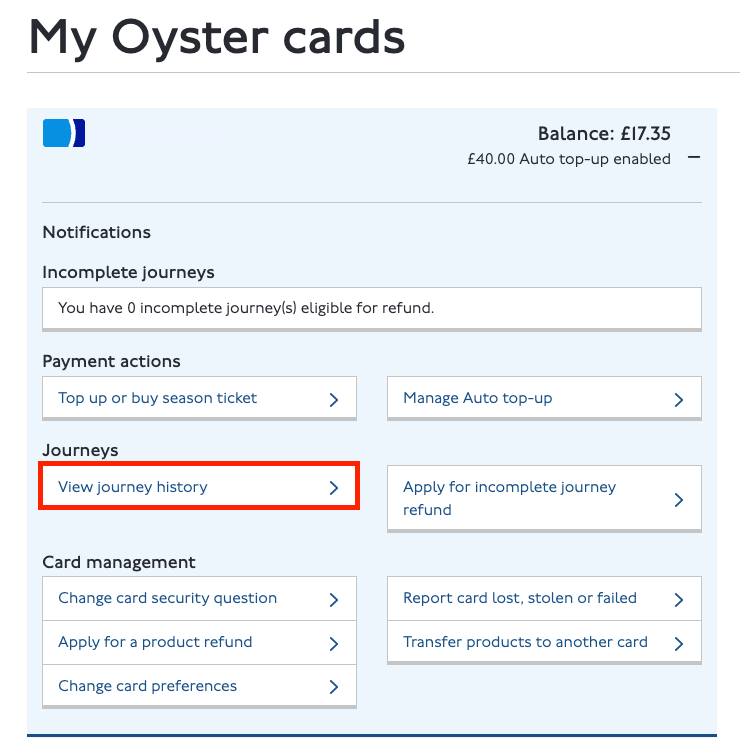
Choose the date range you want to check (for example the last seven days) and submit.
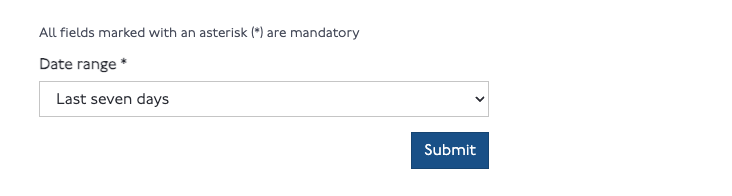
Oyster card: download the CSV. It includes the exact start and end tap times we need.
Contactless / credit or debit card: download the PDF. The contactless CSV does not include the full start and end times of each journey, so the PDF is required for an accurate delay calculation.
Then open Add journeys here and drop the file in; duplicates are skipped automatically.
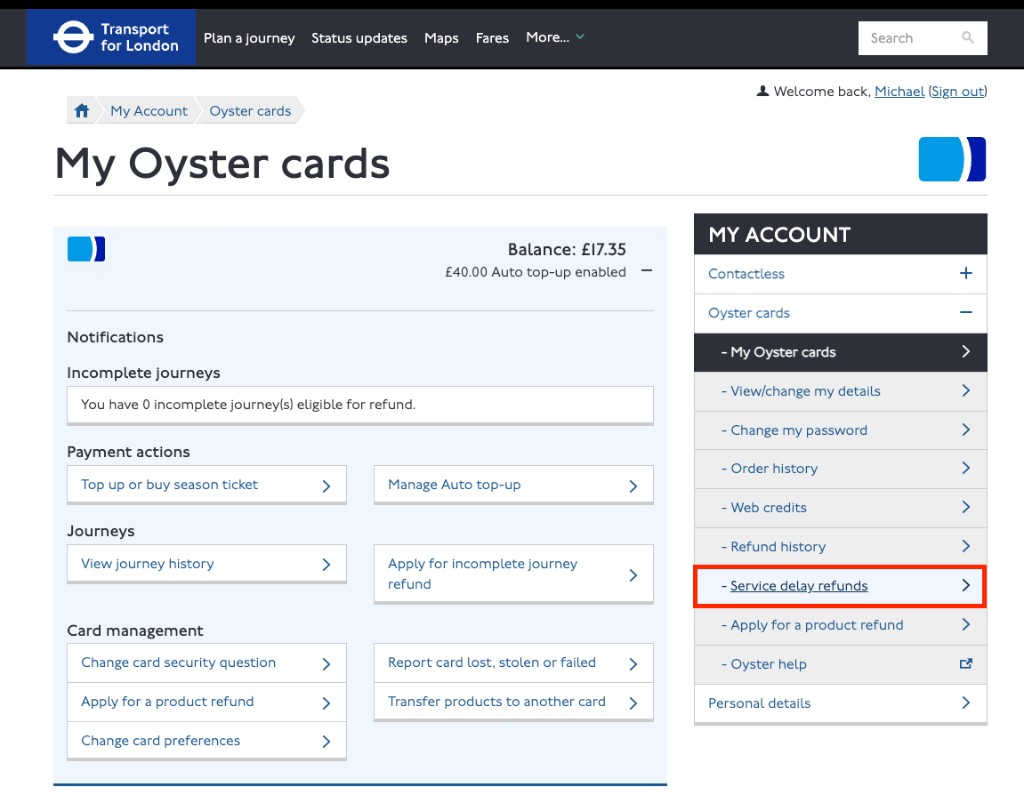
Back in your TfL account, select Service delay refunds in the My Account menu for your chosen Oyster or contactless payment card.
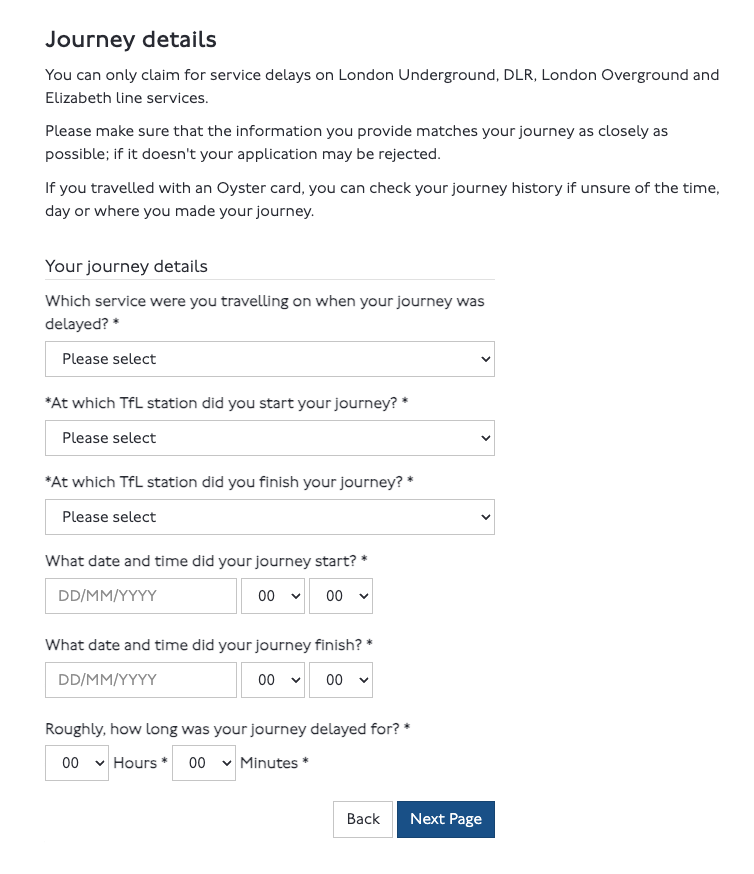
For each likely eligible journey, select Start TfL claim to open TfL's Service Delay Refund form, then use the journey details shown here.
Yes. If you stay signed out, your journeys never leave your browser, we store nothing on our servers. Sign up with an email and we save them to a private record tied to your account so they sync across your devices. The public demo ships with sample data only, never anyone's real journeys.
TfL offers a Service Delay Refund when your journey was delayed 15 minutes or more on the Tube or DLR, or 30 minutes or more on the Elizabeth line or London Overground. You must claim within 28 days.
Expected times are checked automatically using the journey date, departure time and service, then saved for reuse. If a route cannot be identified safely, we ask you to review it instead of guessing.
A scheduled job records TfL line disruptions every few minutes. If a journey overlaps a logged issue on its line, we show the disruption beside that trip. Worth trying follows your suggestion level: Strict starts at 14 minutes for Tube/DLR or 28 minutes for Overground/Elizabeth line, Normal at 12 or 25 minutes, and Lenient at 10 or 20 minutes. TfL's official thresholds remain 15 and 30 minutes.
For an Oyster card, use the CSV. It lists exact start and end tap times. For a contactless or credit/debit card, use the PDF: the contactless CSV omits the full start and end times of each journey, so only the PDF gives an accurate delay calculation.
No. A journey is treated as a duplicate when the card, date, route and both tap times match an existing one, so re-importing is safe.
No. We highlight journeys that may qualify and explain what still needs checking. TfL uses its own timetable and operational records when deciding a claim.
Found a problem, need help with an import, or want to make a privacy request?
Email support